Updated
Sources: the State Department's passport photo page (last updated March 24, 2026), its digital photo page for online renewal (last updated May 4, 2026) and its page on how to respond to a letter or email. Checked September 25, 2026.
What happens after a photo is rejected
Photo problems are common. The State Department says: “Unacceptable photos are the number one reason why we put passport applications on hold.” Here's what to expect.
- You get a letter or email. One of the reasons the State Department lists for contacting you is “We cannot accept your photo.” You may get a phone call instead. The letter can include an illustration of what's needed, such as the photo size.
- Your online status changes. On the day the letter or email goes out, the status becomes Additional Information Needed. After your reply arrives, it changes to Information Received, In Process Again.
- You have 90 days. In the State Department's words: “We need the additional information within 90 days of the date shown on your letter.” Your application may be delayed until you respond.
- You send a new photo. Follow the instructions in the letter. If you mail it, use the address printed on the letter, exactly as written there.
Online renewal
When you renew online, the application's photo tool checks the basics as you upload. That isn't approval. An employee reviews the photo after the State Department receives your application. If there's an issue, you get a letter or email asking you to send a new photo.
Reasons and fixes
These are the problem areas on the State Department's photo page, what each looks like, how to fix it, and which of our automatic checks catches it. Some rules can't be checked by software, so for those you check yourself.
Shadows and uneven light
What it looks like: a dark outline on the wall behind your head, one side of the face darker than the other, or a photo that's too dark or washed out. Overhead lights and lamps far off to one side cause these shadows.
Fix: Face a window or two lamps placed evenly on both sides of the camera. Stand several feet from the wall, as the State Department suggests, so your shadow falls behind you. Don't use the flash.
Our checks: Even light on face, Brightness and Background.
Head too big, too small or off center
What it looks like: the head is outside 1 to 1 3/8 inches from chin to top of head on a 2×2 inch photo, or it isn't centered. It happens when the camera is too close or too far, when a photo is cropped by eye, and when a print is scaled to “fit” the paper.
Fix: Have someone take the photo from about 4 feet away. The State Department says several feet, or 1.2 m. Let the tool crop it, and print at 100% with no cropping. Measure the print with a ruler: it must be exactly 2 inches wide.
Our checks: Head size, Eye height, Top of head visible and Room around you. Check the printed size yourself.
Blurry, grainy or badly printed
What it looks like: a soft or pixelated face, visible printer dots, a photocopy or scan, red eyes, or a print with holes, creases or smudges.
Fix: Use the camera's highest quality setting and the original file, not a screenshot or a copy sent by text. Print on matte or glossy photo paper. Retake a red-eye photo with the flash off instead of editing it.
Our checks: Sharp focus and Resolution. No red eyes appears when red pupils are found. Check the paper and the print yourself.
Edits, filters and AI
What it looks like: smoothed skin, a replaced or cut-out background, a stretched or squeezed image, a filter, or a photo made or changed with AI.
Fix: Submit the original photo. Turn off beauty mode, portrait mode and filters before you shoot. If the wall isn't plain, cover it with a white sheet or blanket and take a new photo. Don't fix the old one.
Our checks: No edits appears only when the file's data names an editing app. Most edits leave no trace the tool can read, so check this yourself. For US photos, this tool only crops and scales the picture evenly. It doesn't retouch it or replace the background.
Pose and expression
What it looks like: a tilted or turned head, looking down, shoulders not square to the camera, eyes closed or covered by hair, an open mouth or an exaggerated expression.
Fix: Sit or stand straight, square your shoulders and look into the lens. A smile is fine if your eyes are open and your mouth is closed. Move hair away from your eyes.
Our checks: Head straight, Facing the camera, Eyes open and Mouth closed.
Glasses, hats and clothing
What it looks like: eyeglasses, even clear ones, sunglasses or glasses resting on the head; a hat; a face covering; a uniform or camouflage; headphones.
Fix: Take them off for the photo. Religious and medical head coverings are allowed with a signed statement if your full face shows. The what to wear for a passport photo guide has every rule.
Our checks: No glasses appears as Review when the tool sees frames or glare. Thin or rimless frames can slip past it. Hats, clothing and headphones aren't checked, so look for them yourself.
Background
What it looks like: a colored wall, texture, lines, a corner, objects behind you, or a white wall that looks gray because the room is dim.
Fix: Use a plain white or off-white wall with nothing on it, or hang a white sheet. Put more light on the wall and step away from it. If you use a wheelchair, part of the head support can show; include a note that explains why the background isn't completely white.
Our check: Background.
Babies and children
What it looks like: a parent's hands or another person in the photo, a pacifier blocking part of the face, a child not facing the camera or making a big expression.
Fix: Lay the baby on a plain white sheet or cover a car seat with one. Keep every hand out of the frame and take the pacifier out. A baby's eyes don't have to be entirely open; all other children need open eyes. The baby passport photo guide has two setups that work.
Our checks: One person, Facing the camera and Mouth closed. Baby photo relaxes the eyes-open check. The one-person check counts faces, so it won't notice fingers at the edge of the frame.
An old photo
What it looks like: a photo taken more than 6 months ago, such as the one in your previous passport.
Fix: Take a new photo.
Our check: Recent photo appears only when a JPEG file carries the date it was taken. Otherwise, check the date yourself.
Examples and what our checker found
We made these example photos with an AI image generator, so they show no real person. On September 25, 2026, we chose each full-size file in this site's tool, set to a US passport photo, in desktop Chrome. The results are quoted word for word. The images on this page are smaller copies of the files we tested.
These pictures are illustrations only. Never use an AI-generated or AI-edited photo for an application. The State Department says: “We check all photos to ensure you are not using artificial intelligence tools.”
Shadow behind the head
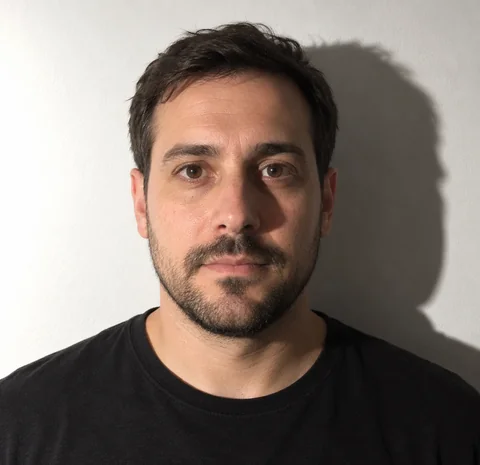
What the checker said: “Fix 2 problems before you use this photo.”
- Background: Fix. “The background has two tones, like a wall edge, a corner or a shadow behind your head. Stand about 2 feet in front of a plain white wall or sheet, facing a window.”
- Even light on face: Fix. “One side of the face is darker. Face a window or lamp directly.”
The other 13 checks were OK, including head size (1.33 in) and eye height (1.27 in).
The fix: Step several feet away from the wall and face the light, so the shadow falls behind you and out of the frame.
Gray wall with a corner
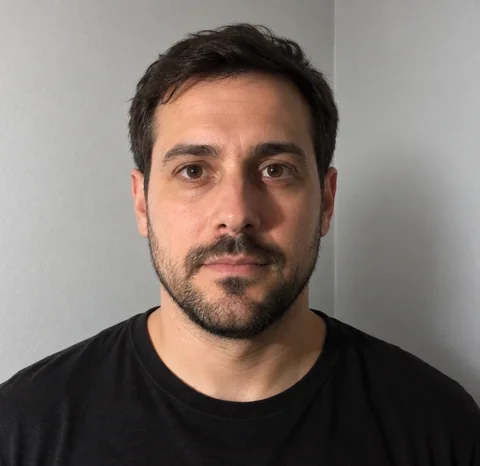
What the checker said: “Fix 2 problems before you use this photo.”
- Background: Fix. “The background has two tones, like a wall edge, a corner or a shadow behind your head. Stand about 2 feet in front of a plain white wall or sheet, facing a window.”
- Even light on face: Fix. “One side of the face is darker. Face a window or lamp directly.”
The other 13 checks were OK, including head size (1.33 in) and eye height (1.27 in).
The fix: Move to a flat stretch of white wall with no corner, trim or door frame in view, and light the wall so it looks white, not gray.
Tilted head and a smile with teeth
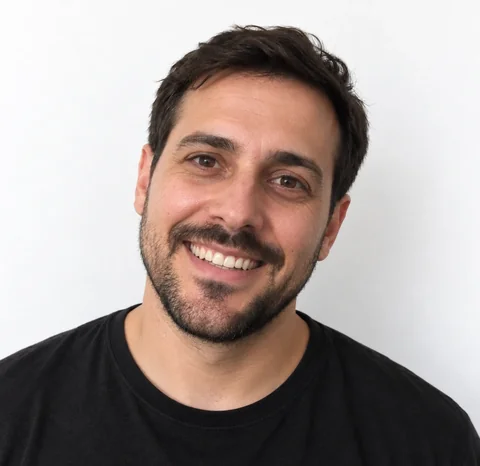
What the checker said: “Fix 2 problems before you use this photo.”
- Head straight: Fix. “The head is tilted about 14°. Keep your eyes level.”
- Mouth closed: Fix. “The lips are apart and teeth show. Close your mouth; a smile with lips together is fine.”
- Even light on face: Review. “One side of the face is darker. Face a window or lamp directly.”
The other 12 checks were OK, including the background.
The fix: Keep your eyes level and close your lips. A small smile with the mouth closed is fine.
Glasses with glare
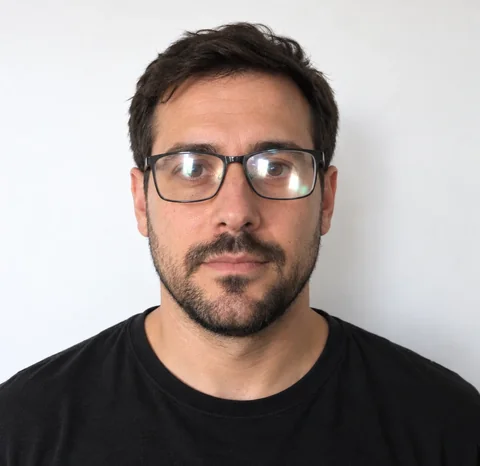
What the checker said: “Usable, but look at the item marked Review.”
- No glasses: Review. “Glasses or glare detected. Take glasses off for US photos.”
The other 15 checks were OK.
The fix: Take the glasses off. The checker marks glasses as Review rather than Fix because it can misread frames, but the rule itself is strict: no glasses without a signed note from a doctor.
Baby photo taken too close
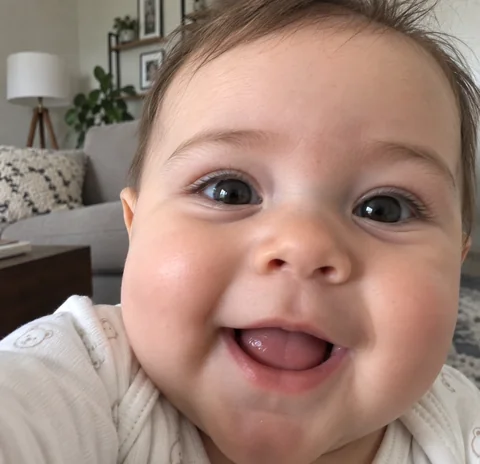
What the checker said: “Fix 3 problems before you use this photo.”
- Mouth closed: Fix. “The lips are apart and teeth show. Close your mouth; a smile with lips together is fine.”
- Room around you: Fix. “The photo needs more room above the head and below the chin and at the sides. Step back from the camera and keep your shoulders in view.”
- Background: Fix. “The background looks too dark in places, uneven, with shadows, lines or objects instead of plain white or off-white. Stand about 2 feet in front of a plain white wall or sheet, facing a window.”
- Head straight: Review. “The head is tilted about 6°. Keep your eyes level.”
- Top of head: Review. “The top of the head was estimated. Check that the whole head and hair fit in the frame.”
The other 11 checks were OK. Checked on the baby photo page with Baby photo on.
The fix: Lay the baby on a white sheet near a window and hold the phone farther away, with space around the head and shoulders. Wait for a calm moment with the mouth closed.
Check your new photo before you send it
- Read the reason in the letter or email, and fix that first.
- Take a new photo. Don't edit the old one.
- Choose it in the free passport photo checker, or make it from scratch with the US passport photo maker. Fix anything marked Fix and look at anything marked Review.
- For a mailed photo, print it at true size on photo paper and measure it: 2 × 2 inches.
- Send it the way the letter says, before the 90 days run out.
Passing every automatic check doesn't guarantee acceptance. The State Department decides. How our passport photo checks work explains what the tool measures and what it can't see.
Questions
How long do I have to send a new passport photo?
90 days from the date shown on your letter. Your application may be delayed until you respond.
How will I know my photo was rejected?
You get a letter or email, and your online status shows Additional Information Needed. The State Department may also call you.
Can I fix my rejected photo with an editing app?
No. The rules don't allow changes with software, apps, filters or AI. Take a new photo that fixes the problem.
My online renewal photo uploaded fine. Why was it rejected later?
The upload step only checks the basics. An employee reviews the photo after you apply, and if there's an issue, you get a letter or email asking for a new photo.
If my new photo passes your checker, will it be accepted?
Not necessarily. The checker catches common problems, but it can't see everything, and the State Department makes the final decision.