Updated
By Passport Photo at Home · Rules checked against the DV instructions page, the DV-2027 entry notice, the August 31, 2026 issuance guidance, the visa photo requirements and digital image requirements · How we check (updated )
DV-2027 entry dates: not announced yet. On November 5, 2025, the State Department said it would announce the DV-2027 registration dates “as soon as practicable” (notice), and that the visa period for DV-2027 selectees stays October 1, 2026 to September 30, 2027. On October 14, 2026, a federal court in California ordered the State Department to announce the DV-2027 registration period on its website, keep it open for 30 days and notify the selectees (order granting a preliminary injunction, Red Eagle Law, L.C. v. Rubio, No. 26-cv-4738, S.D. Cal.). The same day, at the request of both sides, the court moved its deadlines (amended order): announce the registration dates by midnight EST on October 29, 2026, open registration by midnight EST on November 1, and notify the selectees by midnight EST on December 3. On October 19, the government appealed to the Ninth Circuit and asked the court to pause its order (court docket, read October 20, 2026). When we checked on October 18, 2026, the State Department's visa news had no DV-2027 announcement, the DV instructions page still showed the DV-2026 program, and nothing had been announced for DV-2028. Court deadlines can change, so go by the announcement on travel.state.gov, which will also appear in the Federal Register, as the DV regulation requires. You can make your photos now, but each one must be no more than 6 months old on the day you enter.
Separately, the State Department's guidance of August 31, 2026 paused the issuance of all diversity visas while it reviews DV screening: applicants can still apply and attend interviews, but no DVs are issued.
1. One photo per personYou, your spouse and each child, alone, in front of a plain white wall.
2. Crop and checkA 600 × 600 px square, head at 50–69%, nothing edited.
3. Save the JPGName it for the person, then add it to your entry on dvprogram.state.gov.
DV photo checklist
These are the latest official rules: the State Department's DV-2026 instructions, the newest edition published, its visa photo requirements, which DV photos must meet, and the DV regulation, 22 CFR 42.33. If the DV-2027 instructions change them, we'll update this page; if you spot a change first, tell us.
The file you upload
- Format
- JPEG (.jpg)
- Pixels
- 600 × 600, square
- File size
- 240 kB or less
- Compression
- 20:1 or less
- Color
- 24-bit, sRGB
- Tool saves
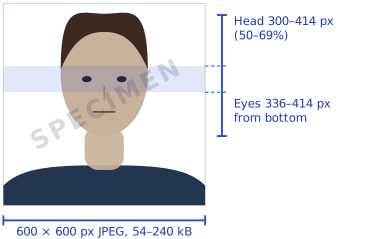
- 600 × 600 px JPG, 54–240 kB
Sources and details
The DV instructions and the DV section of the visa photo requirements ask for a JPEG (.jpg) file of 240 kB (kilobytes) or less, square, 600 × 600 pixels. The DV regulation, 22 CFR 42.33(b)(2), names the JPEG File Interchange Format (JFIF) and asks for a color image. The State Department's digital image requirements for visa photos add 24 bits per pixel in the sRGB color space and a compression ratio of 20:1 or less. For a 600 × 600 color image, that means a file of at least 54 kB (54,000 bytes), so a file squeezed far below that by another app can break the rule while staying under 240 kB.
The tool saves a 600 × 600 px JFIF JPEG in sRGB color, between 54 and 240 kB. The DS-160 visa file and other documents are compared in photo sizes by document.
The photo itself
Taken in the last 6 monthsSo it shows how you look now. DV instructions
Head 50–69% of the heightBottom of the chin to the top of the hair: 300–414 px on the 600 px photo. DV instructions
Eyes 56–69% from the bottom336–414 px above the bottom edge. Composition template
Plain white or off-white backgroundBusy or patterned backgrounds aren't accepted. DV instructions, 22 CFR 42.33
Facing the cameraFull face, head not tilted, neutral expression, both eyes open. DV instructions
In color and in focusBlack-and-white photos aren't accepted. Photo FAQ
No eyeglassesTake them off for the photo. DV instructions
No hat or head coveringUnless worn daily for religious purposes, with the full face visible and no shadows. DV instructions
No headphones or earbudsHearing devices you normally wear can stay. DV instructions
Everyday clothesNo uniform, unless it's religious clothing worn daily. DV instructions
Not manipulatedNo edits, filters, retouching or background changes. DV instructions, photo requirements
An original photoNot copied or scanned from an ID; no snapshots, magazine or full-length photos. DV instructions
What's different from a US passport photo
Need the passport photo itself? The passport photo maker on our home page makes the 2 × 2 in print and the online renewal file.
| US passport photo | DV lottery photo | |
|---|---|---|
| What you submit | A 2 × 2 in print, or a file to renew online | A JPEG uploaded with the entry; prints only if selected |
| Pixels and file | Print: 2 × 2 in. Online: 54 KB to 10 MB | Exactly 600 × 600 px, 240 kB or less |
| Expression | Neutral or a natural smile | Neutral |
| Children | A baby's eyes may be partly closed | Eyes open, looking at the camera |
| Reuse | A new photo for each application | Never the photo from a previous year's entry |
| Edits | None | None; a manipulated photo can disqualify the entry |
What can disqualify an entry
The DV instructions list these reasons an entry can be disqualified or the entrant found ineligible:
- A photo that doesn't fully meet the rules, for anyone on the entry. Your spouse's and children's photos must meet the same rules as yours.
- A manipulated photo. Edited, retouched or filtered, or with a replaced background. For DV photos, this tool doesn't offer Fix it for me or Change background. Drawings of edited and other rejected photos are in passport photo examples.
- The same photo as a previous year's entry. Take new photos for every entry period.
- A photo older than 6 months. Check the date when the entry period opens.
- A missing spouse or child. List your spouse and every unmarried child under 21, even those who won't move with you, each with their own photo. You don't need photos of family members who are already US citizens or permanent residents.
- More than one entry for the same person. All of that person's entries are disqualified.
How to enter
- Wait for the official dates. No entry period is open now. Nobody can enter early or improve your chances.
- Enter only at dvprogram.state.gov. It's the only official entry site, and paper or late entries aren't accepted (Submit an Entry).
- Have everything ready. A photo of each person, plus your valid passport's details and a JPEG scan (not a PDF) of its biographic and signature page, 5 MB or less. That passport rule took effect April 10, 2026 (Federal Register); a few people, such as stateless entrants, are exempt.
- Pay the $1 registration fee on the entry site. Entering used to be free. A fee rule effective September 16, 2025 added $1, collected when you register (Federal Register), so the next entry period will be the first with it.
- Keep your confirmation number. You'll need it to check your result in Entrant Status Check on the same site. The State Department doesn't email or mail selectees (DV instructions).
Use only .gov sites. The DV instructions say only websites ending in .gov are official, and warn that other sites may charge for forms and information that are free on travel.state.gov, or for DV-related services. In November 2025, US embassies warned that claims that DV-2027 had opened, or that someone could increase your chances, were false. Besides the $1 fee on dvprogram.state.gov, entering costs nothing, and making your photos here is free.
DV-2028: what's known
The State Department hadn't published anything about DV-2028 when we checked on October 18, 2026, and DV-2027 registration hadn't opened. For comparison, DV-2026 registration ran from October 2 to November 7, 2024 (DV instructions). Whatever the dates, each entry needs new photos, because a photo used in an earlier year's entry makes you ineligible. The $1 registration fee and the passport rule below apply from the next entry period on.
Common photo problems, and what the tool checks
The State Department's photo examples sort rejected photos into shadows and lighting, size and position, resolution and quality, digital changes, pose and expression, attire, hats and glasses, background, and children. This is what the tool does about each:
| Problem | What the tool does |
|---|---|
| Shadows and uneven light | Checks the light on both sides of the face and looks for your shadow on the wall (fixes for each reason) |
| Head too big, too small or off center | Crops to 600 × 600 with the head at 50–69% and the eyes at 56–69%, then measures both |
| Blurry or low resolution | Checks focus, and that the crop has at least 600 px of your original photo |
| Edits and filters | Edits nothing on a DV photo, and names editing apps it finds in the file. Filters often leave no trace, so check yourself |
| Black and white | Flags a photo without color |
| Pose and expression | Checks a level head, facing the camera, open eyes, a closed mouth and a neutral face |
| Glasses, hats and clothing | Flags glasses it can see. Hats, uniforms and headphones are for you to check |
| Background | Checks for a plain, evenly lit white or off-white wall (setting up a wall at home) |
| Children | Counts faces and checks open eyes. A hand at the edge of the frame is for you to check |
Passing every check doesn't guarantee acceptance. See how our photo checks work, and their limits.
Checklist for each person on the entry
- A new photo for this entry, taken in the last 6 months.
- Alone, facing the camera, neutral face, eyes open.
- Glasses off; no hat unless worn daily for religion.
- Plain white or off-white wall, no shadows.
- 600 × 600 px JPEG, 240 kB or less, nothing edited.
- Named for the person, so the right photo goes with the right name.
Photos of babies and children
The DV instructions say no other person should be in a child's photo and the child should look at the camera with eyes open. The photo FAQ adds that nothing used to support the child, including a parent's hands or arms, may be in the frame. Lay a baby on a plain white or off-white sheet, or cover a car seat with one, and keep shadows off the face. Baby photo doesn't relax any checks for DV photos, so choose a shot with open eyes. See how to take a baby passport photo for both setups.
Scanning a printed photo
The instructions also accept a scan of a recent print: 2 × 2 inches (51 × 51 mm) scanned at 300 pixels per inch, which gives 600 × 600 pixels. Photos copied or scanned from a driver's license or another official document aren't accepted. Choose the scan in the tool: if it's square and already meets the size rules, the tool measures it as it is; otherwise it crops it first and tells you. Every other rule, including the 6 months, still applies.
If you're selected
Each DV applicant brings two identical 2 × 2 inch photos, printed on photo paper, to the visa interview (visa photo requirements). Pick Green card / immigrant visa in the document list and save the 4×6 print sheet, then see how to print passport photos at Walgreens, CVS or Walmart. Each store's page lists what a regular 4×6 print and its passport photo service cost: Walgreens, CVS, Walmart, or every store compared. Applying from inside the US? See green card and USCIS photos. Already have prints from a studio? Check an immigrant visa photo before the interview.
Questions
When does DV-2027 registration open?
It hadn't been announced when we checked on October 18, 2026. The State Department's November 5, 2025 notice says it will announce the dates as soon as practicable, and that the visa application period for DV-2027 selectees stays October 1, 2026 to September 30, 2027. A federal court ordered the State Department to announce the dates by October 29, 2026 and open registration by November 1, for 30 days (court order); the government has appealed. Watch the visa news and DV instructions pages, and enter only at dvprogram.state.gov.
Has DV-2027 been canceled?
No cancellation has been announced. The November 2025 notice is the State Department's latest word on DV-2027 entries, a court has since ordered it to open registration, and no registration dates had been posted when we checked on October 18, 2026. Any site that takes DV-2027 entries before the State Department announces the dates isn't official.
Are diversity visas being issued right now?
Not when we checked on October 9, 2026. The State Department's August 31, 2026 guidance paused all diversity visa issuances during a review of DV screening, with no exceptions; applicants can still apply and attend interviews.
Has DV-2028 registration started?
No. Nothing had been announced for DV-2028 when we checked on October 18, 2026, and DV-2027 registration hadn't opened either. A site that says it's taking DV-2028 entries now isn't the official one.
What size is a DV lottery photo?
A square JPEG of exactly 600 × 600 pixels and 240 kB or less, with the head 300–414 px tall (50–69%) and the eyes 336–414 px above the bottom edge (56–69%). A scanned print must be 2 × 2 inches (5.1 × 5.1 cm), scanned at 300 pixels per inch.
What is the DV photo size in kB?
240 kB or less. The visa digital image requirements also allow at most 20:1 compression, which for a 600 × 600 color photo means about 54 kB or more. The JPG from this tool is between 54 and 240 kB.
Can I take my DV lottery photo with my phone?
Yes, if the photo meets the rules. The instructions accept a new digital photo, and the photo FAQ turns down low-resolution phone photos, so use daylight from a window, a plain white wall and, if you can, a helper with the back camera. The tool checks the resolution and focus. Phone settings to turn off first: passport photo with an iPhone or Android phone.
Can a DV lottery photo be edited?
No. A manipulated photo can make you ineligible. Cropping and resizing to 600 × 600 is how the State Department's own photo tool prepares a photo; retouching, filters, brightening and background changes aren't allowed. This tool crops and resizes the photo and levels a slightly tilted head; it doesn't retouch the face, the colors or the background.
Can I use the same photo as last year?
No. The instructions say that submitting the same photo as a prior year's entry makes you ineligible, and a photo from last year is older than 6 months anyway.
What background color does a DV photo need?
Plain white or off-white, with no pattern and no shadow behind your head. Stand a step or two in front of a white wall and face a window.
Can I wear glasses in my DV photo?
No. The instructions say not to wear eyeglasses. More on clothes, hats and jewelry: what to wear for the photo.
Do my spouse and children need photos?
Yes. Each person listed on your entry needs their own photo that meets the same rules, including children who won't move with you. You don't need one for a family member who is already a US citizen or permanent resident.
Is the DV lottery free?
Almost: from the next entry period on, it costs a $1 registration fee, paid on dvprogram.state.gov when you register. Entering used to be free. You don't need to pay anyone else to enter, and making your photos with this tool is free. Paid photo services are compared on what passport photos cost.
Do I need a passport to enter?
Yes, for most people. Since April 10, 2026, you enter your valid passport's details and upload a JPEG scan of its biographic and signature page, 5 MB or less, with your entry. A few people, such as stateless entrants, are exempt.
How do I check a DV photo I already have?
Choose it on this page, or open the photo checker set to DV lottery. It measures the head and eyes, the background, light and focus, and saves a 600 × 600 JPG of 54–240 kB. Then go through the reminder next to the save button: no glasses, taken in the last 6 months, no edits, and not a photo from an earlier entry.
Can I use my DS-160 visa photo?
The composition rules are the same, but a DV file must be exactly 600 × 600 pixels, taken in the last 6 months, and never used for an earlier DV entry. Making a fresh DV photo is simpler. For the visa application itself, see the US visa (DS-160) photo or check a DS-160 photo. En español: foto para visa americana.
Is this the official DV photo tool?
No. This is an independent tool, not a government site; about this site says who runs it. The State Department's photo tool only crops a photo to 600 × 600 and doesn't check its quality. Entries go only through dvprogram.state.gov.