Updated
What happens to your photo, step by step
- The photo opens in your browser. For a JPEG file, the tool also reads three things from the file's data when they're there: the date the photo was taken, its orientation, and the name of the app that saved it.
- Face detection. Google's open-source MediaPipe Face Landmarker looks for up to two faces and places 478 points on the largest one. It also gives scores for blinking, an open jaw and smiling. If the face is sideways or upside down, the tool turns the photo and tries again. If no face is found, it looks again in the upper middle of the photo for a small face.
- Person outline. MediaPipe's selfie segmenter separates you from the background. That outline gives the top of your hair and the background area to check. If the outline can't show the top of the head, the tool estimates it from the face and marks “Top of head” as Review.
- Crop. The tool crops the photo to the document's size, with the head in the middle of the allowed range and, for US documents, the eyes in the middle of their band. On the passport photo checker, a photo that already has the document's shape is measured as it is instead.
- Checks. Each check gets one of three results: OK, Review or Fix. With any Fix, the verdict tells you how many problems to fix, such as “Fix 1 problem before you use this photo.” With Review items and no Fix, it says “Usable, but look at the item marked Review.” When everything is OK, it says “Ready. All automatic checks passed.”
If face detection can't load or can't find the face, you can tap the chin and the top of the head yourself. Size, background and focus are still checked; eyes, expression and light show as Not checked.
Every automatic check, with its threshold
Thresholds are the exact numbers the tool uses. Brightness is on a scale of 0 (black) to 255 (white).
- One person. Counts the faces. OK: exactly one. Fix: two or more.
- Head straight. Angle of the line between the centers of the eyes. OK: up to 5°. Review: up to 8°. Fix: more.
- Facing the camera. How far the nose sits from the middle of the face, as a share of half the face width. OK: up to 12%. Review: up to 22%. Fix: more.
- Eyes open. MediaPipe's blink score for each eye, from 0 to 1. OK: below 0.45. Fix: otherwise. With Baby photo on, Fix becomes Review where the document's rules allow it.
- Mouth closed. The jaw-open score, and the gap between the lips compared with the face height. Fix: a jaw score above 0.25 or a lip gap above 2%.
- Expression. The smile score, for documents that need a neutral face. Review: above 0.35. US passport photos allow a natural smile, so this is always OK for them.
- Head size. Chin to top of head in the cropped photo. OK: inside the document's range. Fix: outside it.
- Eye height. Eyes above the bottom edge, for US documents. OK: inside the range. Fix: outside it.
- Top of head visible. Space between the top of the hair and the top edge. Fix: less than 0.5 mm at print size. China uses its 3–5 mm rule instead.
- Room around you. Whether the crop fits inside your original photo. Fix: the crop runs more than 0.5 mm past any edge.
- Resolution. Pixels in the crop. Printed photos: OK at 250 dpi or more, Review from 180 dpi, Fix below. Uploads: OK at the form's minimum, Review down to 75% of it, Fix below.
- Background. Brightness, color and evenness of the background inside the crop, leaving you out. OK: brightness of at least 190 (170 for light-colored backgrounds), little color, and even. Fix: two tones, or much too dark, tinted or uneven. Review: smaller misses, or too little background to judge.
- Even light on face. Brightness of three spots on each cheek, the darker side compared with the brighter side. OK: 75% or more. Review: 50–74%. Fix: below 50%.
- Brightness. How much of the face is washed out or nearly black, and whether the light is behind you. Review: 25% or more washed out, 40% or more nearly black, or the face far darker than the background.
- Sharp focus. Edge contrast on the face (the variance of the Laplacian on a 160×160 copy). OK: 40 or more. Review: less.
A background has “two tones” when the median brightness of its top 30% differs from the rest by more than 30, or its left half differs from its right half by more than 30. A wall edge, a corner and a shadow behind the head all do that.
Checks that appear only when they apply
- No glasses: Review when the tool finds a dark frame bridge between the eyes together with a rim under an eye, or bright glare around an eye. For China and Schengen visas, which allow glasses, it only looks for glare.
- No red eyes: Review when a quarter or more of a pupil is red.
- Recent photo: Review when a JPEG's date shows it's older than the document allows: 6 months for US documents, 1 month for a UK passport. A camera photo shows “Taken just now.”
- No edits: Review when the file says it was saved by a known editing app, such as Snapseed, Facetune, Lightroom or Photoshop.
- Top of head: Review when the top of the head had to be estimated.
- Photo shape: on the checker, when a photo is measured as it is, Fix if its shape doesn't match the document's.
- Background replaced: always Review. Changing the background is offered only for China and Schengen visa photos, off by default, and the result never says Ready after it.
The targets for each document
The numbers come from each document's official rules. The last figure is the crop height the Resolution check needs for OK.
- US passport: head 1–1⅜ in; eyes 1⅛–1⅜ in above the bottom edge; white or off-white background; 500 px tall (250 dpi at 2×2 in).
- US online renewal: head 1–1⅜ in; eyes 1⅛–1⅜ in above the bottom edge; white or off-white background; 600 px tall.
- US visa (DS-160): head 1–1⅜ in; eyes 1⅛–1⅜ in above the bottom edge; white or off-white background; 600 px tall.
- DV lottery: head 1–1⅜ in; eyes 1⅛–1⅜ in above the bottom edge; white or off-white background; 600 px tall.
- Green card / immigrant visa: head 1–1⅜ in; eyes 1⅛–1⅜ in above the bottom edge; white or off-white background; 500 px tall (250 dpi at 2×2 in).
- China visa: head 28–33 mm; 3–5 mm of space above the head; plain white background; 472 px tall.
- Schengen visa: head 32–36 mm; top of the head inside the photo; plain, light-colored background; 443 px tall (250 dpi at 35×45 mm).
- UK passport: head 29–34 mm; top of the head inside the photo; plain, light-colored background; 750 px tall.
- India passport: head 36–38.25 mm; top of the head inside the photo; plain white background; 810 px tall.
US visa and DV rules give the head and eyes as a share of the image height: 50–69% and 56–69%. The tool measures them with the same proportions as a 2×2 inch photo, where 1 to 1 3/8 inches is 50–69%. For online renewal, the State Department lists no pixel size or head size, so the tool uses the printed photo's proportions and a 600 px minimum.
What the checks can't see
- AI-made or AI-edited photos. The tool can't tell them from camera photos. Every example on this page is AI-generated, and four of them got Ready. The State Department says: “We check all photos to ensure you are not using artificial intelligence tools.”
- Most filters and retouching. Beauty modes, skin smoothing and portrait blur usually leave no trace the tool can read. No edits appears only when the file names an editing app.
- Some glasses. Rimless or thin frames without glare can go unnoticed, and glasses only ever get Review.
- Hats, head coverings, uniforms, headphones and masks. Not checked. Look for them yourself.
- Hands and hair. The one-person check counts faces, so a hand at the edge of the frame isn't flagged. Hair over the eyes isn't checked directly.
- The photo's age without a date. PNG and HEIC files, screenshots and copies sent through chat apps usually carry no date the tool can read, and a date in a file can be wrong.
- Skin tone accuracy. The background's color is checked; skin color isn't.
- The print. Paper, printed size, printer dots, creases and smudges happen after the file leaves the tool. Measure the print with a ruler.
- Signed statements and the final decision. The tool can't know about a doctor's note or a religious statement, and it doesn't approve photos. The agency reviewing your application does.
Test results with example photos
We made these example photos with an AI image generator, so they show no real person. On September 25, 2026, we chose each full-size file in this site's tool, set to a US passport photo, in desktop Chrome. The results are quoted word for word. The images on this page are smaller copies of the files we tested.
These pictures are illustrations only. Never use an AI-generated or AI-edited photo for an application. The State Department says: “We check all photos to ensure you are not using artificial intelligence tools.”
Four photos rated Ready
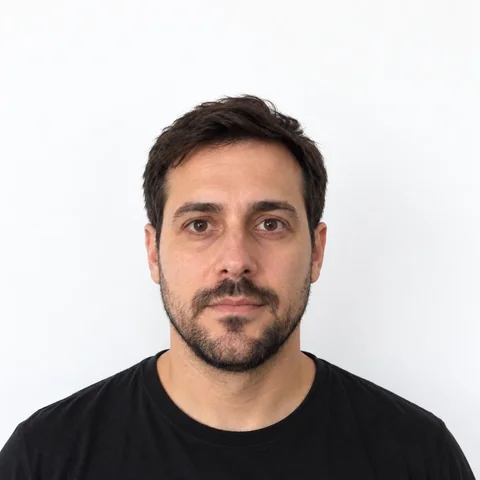
What the checker said: “Ready. All automatic checks passed.”
All 15 checks were OK, including head size (1.26 in), eye height (1.19 in) and resolution (551 dpi at 2×2 in).
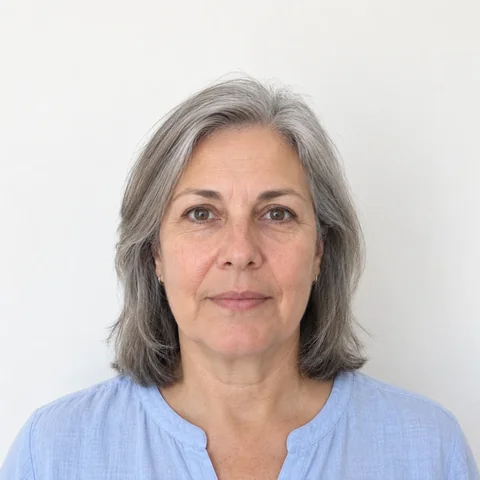
What the checker said: “Ready. All automatic checks passed.”
All 15 checks were OK: head size 1.26 in, eye height 1.19 in, 575 dpi.
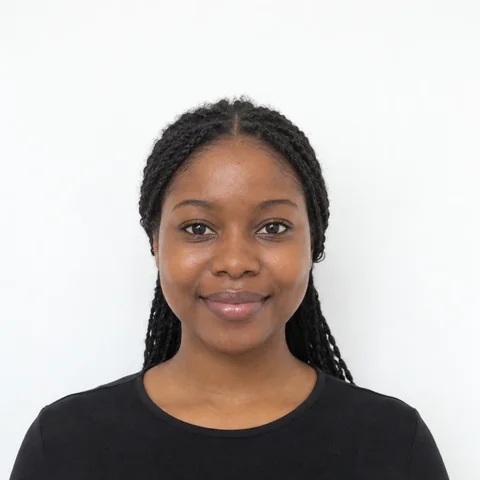
What the checker said: “Ready. All automatic checks passed.”
All 15 checks were OK: head size 1.19 in, eye height 1.19 in, 552 dpi.
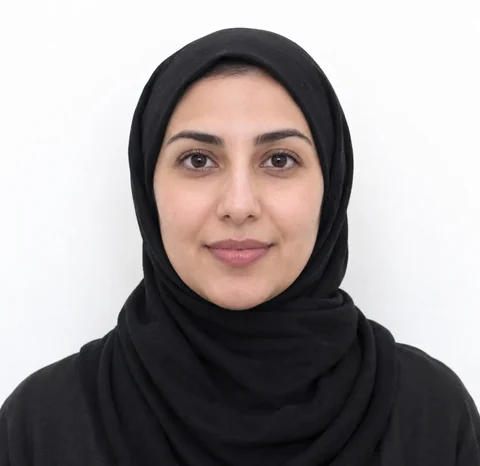
What the checker said: “Ready. All automatic checks passed.”
All 15 checks were OK: head size 1.22 in, eye height 1.31 in, 604 dpi. No check looks at head coverings, so the signed statement is up to you.
These four got Ready even though an AI generator made them. That's the first limit above in action: a photo can pass every automatic check and still break a rule.
A baby photo with one Review
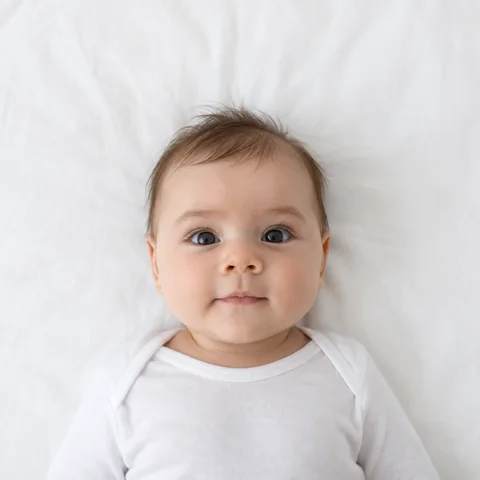
What the checker said: “Usable, but look at the item marked Review.”
- Even light on face: Review. “One side of the face is darker. Face a window or lamp directly.”
The other 14 checks were OK, including head size (1.19 in) and eye height (1.23 in). Checked on the baby photo page with Baby photo on.
The fix: Turn the sheet so the top of the baby's head points at the window, and keep your body out of the light.
Same photo, two results
The first example is a square file. On the checker, a square photo is measured exactly as it is, and there it got “Fix 1 problem before you use this photo.” with “Eye height: Fix. Eyes 1.06 in above the bottom edge. Needs 1⅛–1⅜ in. Tap Crop it for me under the photo.” On the passport photo maker, the same file is cropped for you, the eyes land at 1.19 in, and it's Ready. The photo is fine; its framing wasn't.
All ten examples
- Man, white wall: Ready.
- Woman, light blue top: Ready.
- Woman, closed-mouth smile: Ready.
- Woman, head covering: Ready.
- Baby on a white sheet: 1 Review (Even light on face).
- Shadow behind the head: 2 to fix (Background, Even light on face).
- Gray wall with a corner: 2 to fix (Background, Even light on face).
- Tilted head, teeth showing: 2 to fix (Head straight, Mouth closed) and 1 Review (Even light on face).
- Glasses with glare: 1 Review (No glasses).
- Baby, too close, living room: 3 to fix (Mouth closed, Room around you, Background) and 2 Review (Head straight, Top of head).
The problem photos, with pictures and the fixes, are on the passport photo rejected page.
Your photo stays on your device
All of this runs in your browser. The page downloads the MediaPipe model files from jsDelivr and Google Cloud Storage; your photo never goes the other way. Detecting the face, cropping, checking and building the files you save all happen on your phone or computer.
While the tab is open, the last cropped photo is kept in the browser's session storage so you can save it again after a reload. It's gone when you close the tab. To learn which checks fail most, the page sends anonymous counts of events, such as the name of a failed check and the kind of browser. They never include the photo, the face points or any measurement. The privacy policy has the details.
Where the rules come from
Each document's rules come from its official page. We compare the tool with these pages and show the date of the last check:
- US passport: checked September 25, 2026
- US online renewal: checked September 25, 2026
- US visa (DS-160), DV lottery, Green card / immigrant visa: checked September 25, 2026
- China visa: checked September 25, 2026
- Schengen visa: checked September 25, 2026
- UK passport: checked September 25, 2026
- India passport: checked September 25, 2026
If an official page says something different from this site, follow the official page.
Changes to the checks
- September 25, 2026: the background check now also compares the left and right halves of the wall, so a corner or edge behind the head gets Fix, like a shadow above it already did. A new check marks glasses or glare on glasses as Review.
Questions
Is my photo uploaded for checking?
No. Face detection and every check run in your browser. Only the model files are downloaded.
Can the checker tell if a photo was made or edited with AI?
No. It measures size, position, light and focus. An AI-made photo can pass every check, as the examples on this page show, and the State Department checks all photos for AI.
My photo passed here. Why was it rejected?
The checks can't see everything: glasses without glare, edits, the photo's age, the print itself. A reviewer also judges things no software measures. The rejected photo guide covers the common reasons.
Why did the same photo get different results on two pages?
The checker measures a photo that already has the document's shape exactly as it is. The maker crops it for you. If the checker fails a photo on size, choose the original, uncropped file or tap Crop it for me.
Why is glasses only a Review, not a Fix?
Because detecting frames from pixels isn't reliable enough to fail a photo. The rule for US photos is still strict: take glasses off.